What Is Scratch Game Design for Teens?
Scratch is a visual programming environment that allows learners to create interactive stories, animations, games, and other digital projects by connecting programming blocks.
When designing a game with Scratch, teens can learn fundamental programming concepts without immediately dealing with the complexity of text-based programming languages. For example, they can learn how to make a character move, respond to events, interact with objects, keep track of scores, and determine when a game should end.
This makes Scratch a useful environment for turning abstract programming concepts into visible and interactive experiences.
However, the main goal of teaching Scratch to teens should not be limited to creating entertaining games. More importantly, Scratch can help develop algorithmic thinking, problem-solving, project design, and foundational programming skills.
Why Is Game Design Useful for Learning Programming?
Programming becomes more meaningful when students can see how the concepts they learn are applied in a real project.
For a teenager, creating a game can provide exactly this type of experience. A teen may begin with a simple idea such as creating a game where a character avoids obstacles. However, turning that idea into a working game requires solving several problems:
- How should the character move?
- How should obstacles appear?
- How should collisions be detected?
- How should the score be calculated?
- When should the game end?
- How should the game move to the next level?
- How can the difficulty increase?
Each question can become a programming problem.
As a result, teens gradually understand that programming is not simply about writing instructions. It is a process of analyzing problems, designing solutions, testing ideas, and improving results.
What Skills Can Teens Learn Through Scratch Game Design?
Scratch game design can help teenagers develop a combination of technical and cognitive skills.
1. Algorithmic Thinking
Teens learn how to define a sequence of steps needed to achieve a specific result.
For example, the basic logic of character movement in a game may include:
- Receive input from the player.
- Check the character’s current state.
- Change its position.
- Check for collisions.
- Update the score.
- Display the result.
This type of thinking provides a foundation for many future programming activities.
2. Problem-Solving
Different problems naturally appear while creating a game. A character may not move correctly, the score may not update properly, or an event may run more than once.
Teens need to identify the problem, find its possible cause, design a solution, and test it.
3. Logical Thinking
Programming often involves decision-making. Teens need to understand what should happen when a specific condition is true.
For example:
If the character touches an obstacle, the player loses one life.
Or:
If the player reaches a certain score, the next level begins.
These structures help teens understand the relationship between conditions, decisions, and outcomes.
4. Creativity and Design
Game design gives teens an opportunity to combine programming with creativity. They can design characters, environments, stories, rules, challenges, and game mechanics.
As a result, Scratch projects can provide an environment where programming and creativity work together.
5. Patience and Persistence
A game rarely works perfectly on the first attempt. Teens may need to modify their code several times before achieving the desired result.
This teaches them that errors are a natural part of the development process and that problems can often be solved through testing and improvement.
Steps to Design a Game with Scratch
Designing a successful game is easier when the project is developed step by step. Teens should not necessarily try to create a highly complex game from the beginning.
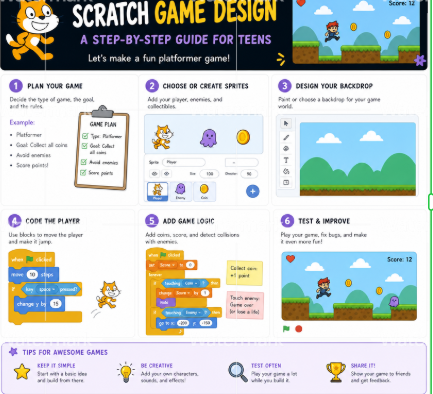
Step 1: Choose a Game Idea
The first step is deciding what the game will be about.
Possible ideas include:
- An obstacle game
- A score-collecting game
- A racing game
- An adventure game
- A puzzle game
- A reaction-based game
- An educational game
The initial idea can be simple. The important point is that the teen can turn it into a manageable project.
Step 2: Define the Game Rules
After choosing an idea, the rules of the game should be defined.
For example:
- The player controls the character using the arrow keys.
- Hitting an obstacle reduces the score.
- Collecting an item increases the score.
- Reaching the destination means the player wins.
This stage introduces teens to the concept of game logic.
Step 3: Design Characters and the Environment
In Scratch, characters and interactive objects are commonly represented as sprites.
Teens can design or choose the main character, enemies, obstacles, collectible items, and other elements of the game.
They can also select or design the backgrounds and game environments.
This stage brings the creative and visual aspects of the project together with programming.
Step 4: Program Character Movement
Once the game elements are ready, the teen can begin programming their behavior.
For example, the character can be programmed to move when the player presses different keys.
At this stage, teens can practice concepts such as events, movement commands, and program control.
Step 5: Add Rules and Conditions
A game needs rules to create meaningful interaction.
Teens need to determine what should happen under different conditions.
For example:
- If the character touches an obstacle, the game stops.
- If the player collects a coin, the score increases.
- If time runs out, the result is displayed.
- If the player reaches the destination, the next level begins.
Conditional and logical structures become especially important at this stage.
Step 6: Add Scores and Variables
Many games require scores, lives, timers, or other changing values.
Using variables, teens can store and update information such as:
- Score
- Time
- Number of lives
- Current level
- Number of collected items
Variables are an important programming concept that will also be useful in more advanced projects.
Step 7: Test and Debug the Game
After creating the first version, the game should be tested repeatedly.
Teens can look for problems such as:
- Incorrect character movement
- Commands that do not work as expected
- Incorrect score updates
- Problems with the game-ending conditions
- Incorrect collision detection
- Events that repeat unexpectedly
Debugging is an essential part of learning programming.
Step 8: Improve and Expand the Game
After completing the initial version, teens can gradually add new features.
For example:
- Additional levels
- New enemies
- Increasing difficulty
- A more advanced scoring system
- Sound effects
- Start and end screens
- High-score tracking
This process teaches teens that a project can be continuously improved and expanded.
Programming Concepts Teens Learn Through Scratch Game Design
One of the main advantages of Scratch is that fundamental programming concepts can be introduced through practical projects.
Events
Events determine when a particular action should begin.
For example, a program can start when the game begins or when the player presses a specific key.
Conditions
Conditions allow a program to make decisions based on a particular situation.
For example, if the player touches an obstacle, a life can be removed.
Loops
Sometimes an instruction needs to run repeatedly. Loops make this possible.
For example, an enemy can continue moving while the game is running.
Variables
Variables are used to store information such as scores, time, lives, or levels.
Messages and Communication
In larger Scratch projects, different parts of a game may need to communicate with each other.
For example, completing one level can send a message that starts the next level.
Coordinates and Position
For more detailed games, teens need to understand how objects are positioned on the screen.
This concept can also become useful in many future graphics and programming projects.
Game Ideas Teens Can Build with Scratch
The complexity of the project should match the student’s current skill level. A project that is too simple may not provide enough challenge, while a project that is too complex can become frustrating.
Some suitable ideas include:
Score-Collecting Game
The player controls a character that collects different items to earn points.
This type of project is useful for practicing variables, movement, and collision detection.
Obstacle Game
The player must guide a character to a destination without hitting obstacles.
This project can help teens practice conditions and collision detection.
Racing Game
The player competes against one or more characters.
This type of project can introduce concepts such as speed, scoring, and winning conditions.
Adventure Game
Teens can create a story with characters, levels, challenges, and different environments.
This can be especially engaging for teens who enjoy storytelling and creative design.
Puzzle Game
A puzzle game can encourage teens to combine logical thinking with programming.
Educational Game
Scratch can also be used to create games that combine entertainment with learning.
For example, teens can design games for practicing mathematics, vocabulary, or problem-solving skills.
How Can Teens Make Their Scratch Games More Professional?
Creating a good game is not only about making the code work. The quality of a project also depends on its design, structure, and user experience.
Start with a Small Project
It is usually better to create a simple version first and then add new features gradually.
This approach prevents the project from becoming unnecessarily complicated.
Design the Game Before Coding
Teens can first plan:
- Who is the main character?
- What is the goal of the game?
- What obstacles exist?
- How does the scoring system work?
- How does the game start?
- How does the game end?
Planning makes the programming process more organized and purposeful.
Keep the Code Organized
As a project becomes larger, organization becomes increasingly important.
Teens should learn to separate different tasks and keep their project structure understandable.
Test the Game Regularly
Testing should not be postponed until the end of the project.
Each part should be tested after it is created so that problems can be identified more easily.
Use Feedback
Teens can share their games with parents, friends, or classmates and ask for feedback.
Someone who created a game may not notice problems that a new player can identify immediately.
Common Mistakes in Scratch Game Design Education
When choosing a programming course for a teenager, parents should look beyond whether the class is simply entertaining.
One common mistake is focusing only on creating a few finished games. In this approach, a student may learn how to reproduce a project without developing a deeper understanding of the logic behind it.
Another common mistake is starting with projects that are too complex. Effective instruction should match the student’s current ability and introduce new concepts gradually.
It is also important for teens to have opportunities to design, test, make mistakes, and improve their projects.
The goal of programming education should not be limited to producing a visually attractive result. The learning process behind that result is equally important.
The Role of Parents in Teen Programming Education
Parents play an important role in developing a positive attitude toward learning.
Parents do not need to be programmers themselves. More importantly, they can create an environment where teens have opportunities to explore and learn.
Parents can:
- Ask teens to explain their game ideas.
- Ask questions about their projects.
- Avoid focusing only on the final result.
- Give teens opportunities to solve problems independently.
- Encourage them to improve their projects gradually.
- Recognize progress rather than comparing them with others.
In programming education, encountering errors is normal. Teens should understand that an error does not mean failure. Instead, it is part of the learning and software development process.
Is Scratch Still Suitable for Teens?
Some parents assume that Scratch is only designed for young children. However, the way Scratch is used can vary significantly depending on the learner’s age and skill level.
For teens, instructors can introduce more challenging projects involving game logic, variables, conditions, loops, messages, level design, and game-state management.
Therefore, whether Scratch is appropriate for a teenager depends not only on age but also on the complexity of the projects and the teaching approach.
For a teenager with no previous programming experience, Scratch can provide a suitable environment for developing foundational skills. After gaining enough experience, the learning path can continue toward text-based programming languages such as Python.
What Can Teens Learn After Scratch?
Scratch can be the beginning of a broader programming learning journey.
After becoming familiar with concepts such as algorithms, conditions, loops, variables, and events, teens may find it easier to understand the structure of text-based programming languages.
A possible learning path can be:
Programming Logic → Scratch → More Advanced Projects → Text-Based Programming → Python → Advanced Projects
The learning path should be adjusted according to the student’s skills and interests.
For example, a teenager who enjoys games can begin by designing games with Scratch and then gradually move toward more advanced programming and game development projects.
Scratch Programming Courses for Teens at CodeTurtleLab
At CodeTurtleLab, programming education for children and teens focuses on practical learning, real programming concepts, and project-based activities.
Through Scratch courses, teens can become familiar with programming concepts such as algorithms, program logic, conditions, loops, variables, and interactive project design.
A project-based approach gives students an opportunity to apply what they learn by creating their own digital projects.
For teenagers interested in game design, animation, and interactive projects, learning Scratch can be a valuable starting point for exploring programming more deeply.
How Should Parents Choose a Scratch Course for Teens?
Parents can consider several important factors when choosing a programming course.
Course Level
The course should match the student’s current knowledge and ability. Beginners should have an opportunity to learn foundational concepts before moving to more advanced topics.
Project-Based Learning
Students should have opportunities to apply programming concepts through practical projects.
Understanding Concepts Instead of Memorizing Commands
Teens should understand why a particular command is used and what problem it solves.
Opportunities for Creativity
Students should be able to design and personalize at least part of their projects.
Feedback and Project Improvement
Evaluation should not focus only on whether the final result is correct. The student’s problem-solving process, progress, and ability to improve the project also matter.
A Clear Learning Path
A good course should provide a foundation for future programming education.
Conclusion
Scratch game design for teens can be an engaging and purposeful way to introduce teenagers to programming. Through game development, teens can learn concepts such as algorithms, conditions, loops, variables, events, and problem-solving.
More important than simply creating an attractive game is the process behind it. Teens develop an idea, design the rules, build the project, test it, identify errors, and improve the final result.
For parents, a programming course becomes more valuable when it goes beyond entertainment and also develops logical thinking, creativity, problem-solving, and programming skills.
If a teenager is interested in games, technology, and digital projects, Scratch can provide a practical starting point for exploring programming and developing skills that can support future learning.
Frequently Asked Questions
Is Scratch suitable for teenagers?
Yes. Scratch can provide a suitable environment for teenagers who are beginning their programming journey. The complexity of the projects should be adjusted according to the student’s age and skill level.
Can teenagers really learn programming with Scratch?
Yes. Scratch introduces fundamental programming concepts such as conditions, loops, variables, events, algorithms, and program logic. For further development, teens can continue toward text-based programming languages.
Do teens need previous programming experience to start Scratch?
No. Beginner courses can start with the fundamentals. Basic computer skills, including familiarity with a mouse and keyboard, can be sufficient to begin.
What types of games can teens create with Scratch?
As their skills develop, teens can create score-based games, racing games, obstacle games, adventure games, puzzle games, and educational games.
How long does it take to learn Scratch?
The learning time depends on the student’s age, previous experience, learning pace, and the complexity of the projects. Consistent practice and project-based learning can help students make steady progress.
Can Scratch prepare teens for learning Python?
Yes. Scratch can help teens understand programming logic and computational thinking before they move to a text-based language such as Python.
How should parents choose a Scratch course for teens?
Parents should consider the student’s level, the course structure, project-based learning approach, instructor support, opportunities for creativity, and the learning path available after completing the course.
Suggested internal links at the end:



1 Comments